IggyTop: Immunological Graph Yielding Top receptor-epitope pairings#




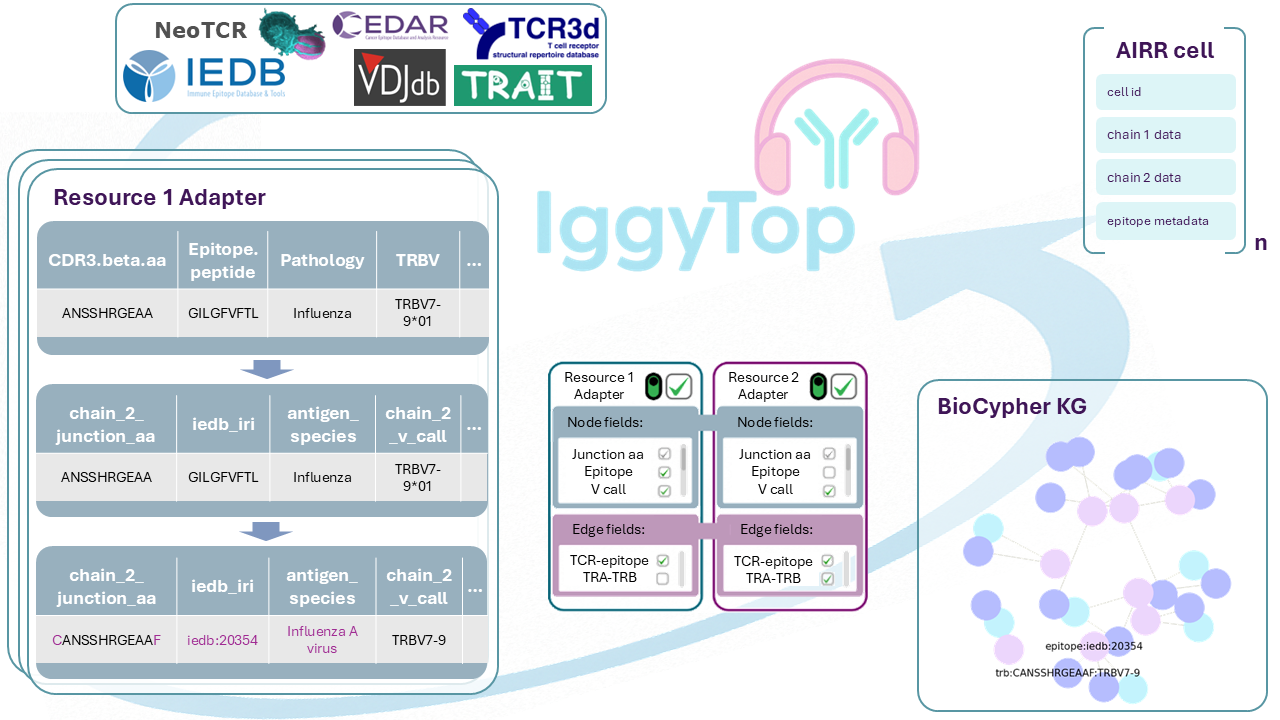
This repository uses the BioCypher framework to harmonize databases with existing immunoreceptor-epitope matching information. The aggregated data is provided in tabular and graph formats.
BioCypher provides a modular architecture where each data source is processed through dedicated transformation scripts called adapters. These adapters are the interface between raw data sources and the IggyTop dataset. We use tidytcells to standardize gene names, cdr3 sequences and junction sequences for both BCR and TCR datasets. We aim to follow AIRR and IMGT standards. This project provides adapters for the following databases:
ITRAP (data filtered from 10X Genomics Dataset)
The aggregated data from all adapters is available in the (bimonthly) releases. These releases are used by Scirpy, which provides a simple interface to access the data in anndata format. You can also rebuild the DB using the provided code with custom parameters. On a consumer laptop, building the full DB typically takes 20-30 minutes.
Quick start (Scirpy)#
To use the database in Python, install Scirpy (>=v0.24.0). Then use this function to load the dataset in anndata format:
import scirpy as ir

iggytop = ir.datasets.iggytop(deduplicated=True, tag='latest')

# Or (e.g. for VDJdb only)
vdjdb = scirpy.datasets.vdjdb(tag='latest')
Graphs vs. Tables#
Two paths are covered: a tabular path that stacks source databases into a large table (used in Scirpy and Releases), and a knowledge graph path that converts the source data into a graph. Both are documented in the documentation. For details, see Graph Data Structure and Tabular Data Structure.
Prerequisites#
To run DB/graph generation locally:
Installation#
Clone the repository:
git clone https://github.com/biocypher/iggytop.git
cd iggytop
Install dependencies using uv:
# Core installation (includes dev dependencies)
uv sync

# Include documentation and Jupyter tools
uv sync --group docs
You are ready to go!
uv run create_knowledge_graph.py
or
uv run create_anndata.py
More information can be found in the documentation.
Documentation#
We use Sphinx for documentation (see ./docs).
The full documentation is available online via Read the Docs.
Pipeline#
create_anndata.py: obtain harmonized, merged (and deduplicated) data from all (or selected) databases in anndata format. It initializes the adapters but does not generate the knowledge graph. The main purpose is integration into Scirpy. You can specify which adapters to include:
uv run create_anndata.py --adapters VDJDB CEDAR --filter-10x
create_knowledge_graph.py: the main script that orchestrates the pipeline to build a knowledge graph from tabular data. It brings together the BioCypher package with the data sources, and callsio.create_knowledge_graph()to create a knowledge graph (all available databases by default) and save it in AIRR JSON format. Use the--adaptersflag to select specific source databases:
uv run create_knowledge_graph.py --adapters VDJDB CEDAR --filter-10x
src/iggytop/adapterscontains modules that define each data source adapter.src/iggytop/config/schema_config.yaml: defines the schema of the knowledge graph. It is used by BioCypher to map the data source to the knowledge representation based on ontology (see this part of the BioCypher tutorial).src/iggytop/config/biocypher_config.yaml: defines BioCypher parameters such as the mode, separators, and other options. More on its use can be found in the documentation.
Testing and CI/CD#
IggyTop uses GitHub Actions to automate bimonthly data releases and ensure data integrity through continuous integration.
Currently this only involves the tabular part of IggyTop (create_anndata.py).
Check out the latest release here.
Bimonthly Data Releases#
Find the releases here
Frequency: Automated releases on the 1st day of every 2nd month (first scheduled on May 1, 2026).
Release Assets: Check out the release notes for more information on the released datasets.
Automated Testing#
Before any data is released, the CI pipeline (based on GitHub Actions) runs a validation suite to catch breaking changes in upstream databases.
How to run tests locally:
# Install all dependencies (including docs for notebook testing)
uv sync --all-groups

# Install Jupyter kernel for notebook execution (one-time setup)
uv run python -m ipykernel install --user --name python3

# Run all tests (including notebook validation)
uv run pytest tests/
Why the kernel installation? The test suite includes validation of Jupyter notebooks (tutorials and database summaries) to ensure they execute without errors. This requires a Jupyter kernel registered with the name “python3” to match the notebooks’ configuration. The installation is a one-time setup per environment.
How to test the CI pipelines
Ensure you have Docker and act installed, then run:
# Run the workflow
act workflow_dispatch -W .github/workflows/ci_ingestion.yml
Graph visualization using Neo4j on Docker#
This repo also contains a docker compose workflow to create the example
database using BioCypher and load it into a Dockerized Neo4j instance
automatically. To run it, execute
docker compose up -d --build
in the root directory of the project. The example instance consists of the TCR3d database only as it is small enough to visualize, for other database compositions, just edit the create_knowledge_graph_docker.py script to your needs. This will start up a single (detached) docker
container with a Neo4j instance that contains the knowledge graph built by
BioCypher as the DB docker, which you can connect to and browse at
localhost:7474. Authentication is set to neo4j/neo4jpassword by default
and can be modified in the docker_variables.env file.
Open http://localhost:7474 to access the Neo4j database. You can now run queries against the database. To get a visual representation of the TCR3d knowledge graph constructed by IggyTop, run the following Cypher query:
MATCH (n) return n
The biocypher_docker_config.yaml file is used instead of the
biocypher_config.yaml. Everything else is the same as in the local setup. The
first container installs and runs the BioCypher pipeline, and the second
container installs and runs Neo4j. The files created by BioCypher in the first
container are copied and automatically imported into the DB in the second
container.
Contributing#
Contributions are welcome! Please feel free to submit a Pull Request or create an Issue if you discover any problems.
License#
This project is licensed under the MIT License - see the LICENSE file for details.
Citation#
If you use IggyTop in your research, please cite it using the following DOI:
You can find the full citation details on the Zenodo page.
We also provide a CITATION.cff file for customized citations.